Managing Band Photos with Lightroom Classic
Before we delve into shooting techniques, it’s important to discuss file management. Your photos can accumulate quickly, making it easy to misplace your best shots. Additionally, the band director might want to feature one of your images on their social media, and you may struggle to locate it. To prevent such situations, let’s explore my favorite app for file management and editing.
In my humble opinion, one of the most helpful tools you can use is Adobe Lightroom Classic. It’s designed specifically for photographers who want to stay organized while also having powerful, easy-to-use editing tools at their fingertips. You don’t need to be a professional to benefit from it, many of its best features are perfect for busy parents who want to spend less time sorting photos and more time enjoying them.
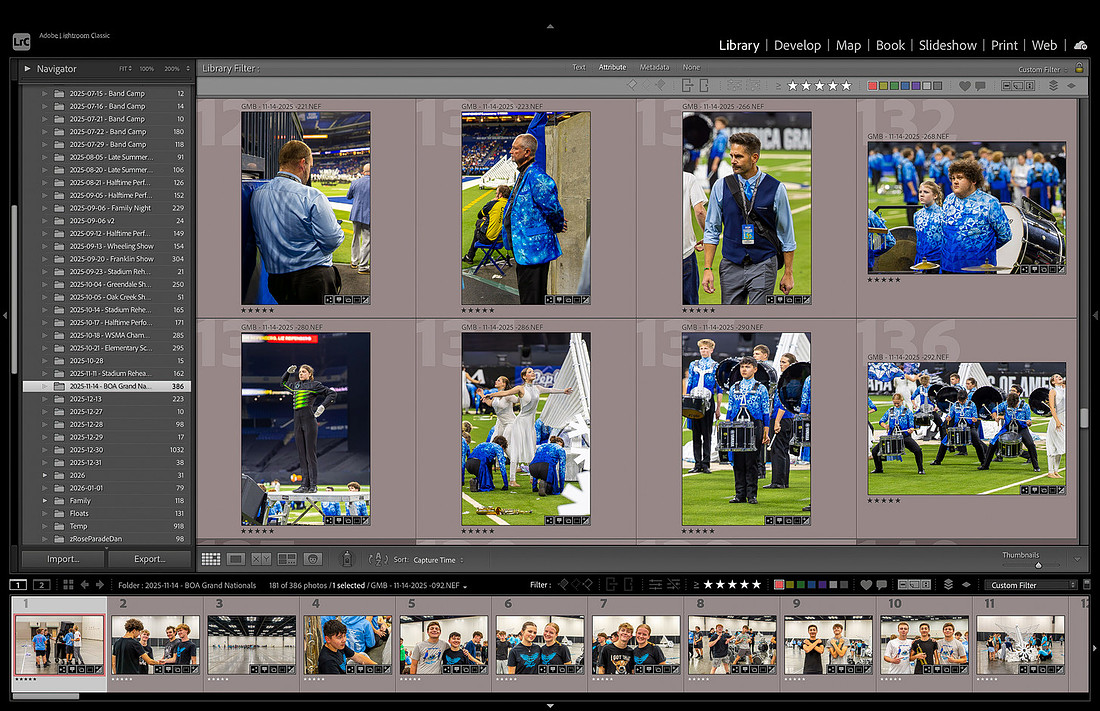
 My use of Adobe Lightroom Classic reflects a long-standing professional preference developed through years of consistent, real-world application. Having worked with the software since 2012, I have found it to be a highly dependable platform capable of meeting even the most demanding post-processing and organizational needs.
For example, during my time as the principal photographer for the Madison Scouts, I captured more than 15,000 images over the course of the 2013 season. Despite the challenges of a travel-intensive schedule, I was able to efficiently manage, organize, and process that entire catalog while on the road. Lightroom’s ability to maintain performance, streamline workflow, and keep large volumes of images accessible and well-structured proved essential in delivering timely, high-quality results throughout the season.
A big advantage of Lightroom Classic is that it keeps everything in one place. Instead of having photos scattered across folders on your computer, external drives, or memory cards, Lightroom allows you to create a central catalog. Think of it like a digital library for your band season. You can quickly find images from a specific rehearsal, competition, or even a particular moment, without digging through endless folders.
Organization becomes even more powerful with simple tools like keywords, ratings, and flags. For example, you might tag photos with terms like “band camp,” “competition,” “halftime,” or even your student’s name. Later, when you want to find those images, it takes just seconds. You can also “star” your favorite shots or flag the ones you want to edit, helping you focus your time on the images that matter most.
Another benefit is how Lightroom handles large volumes of photos without slowing you down. During marching band season, it’s not unusual to take hundreds of photos in a single evening. Lightroom is built to handle that kind of workload smoothly. You can import all your images at once, quickly review them, and narrow them down to your best shots without feeling overwhelmed.
When it comes to editing, which I will dive into in greater detail down the road, Lightroom keeps things simple and efficient. Instead of spending hours adjusting each image individually, you can make quick improvements, like adjusting brightness, color, or sharpness, and then apply those same settings to multiple photos at once.
 Just as important as the tools themselves is the workflow you create. A simple, repeatable process can make your photography experience much more enjoyable. For example, after each event, you might import your photos, quickly review and select your favorites, add a few keywords, and make basic edits. By keeping this process consistent, you’ll stay organized all season long, and avoid the stress of trying to sort everything out at the end.
It’s also worth remembering that you don’t have to keep every single photo. Part of managing large amounts of images is giving yourself permission to narrow things down. Blurry shots, duplicates, or photos that don’t quite capture the moment can be set aside so your best images stand out. This makes it easier to share albums with family, create photo books, or simply revisit your favorite memories.
Most importantly, tools like Lightroom Classic are there to support you, not slow you down. The goal isn’t perfection; it’s preserving the experience. Marching band seasons go by quickly, and your photos become a meaningful way to remember the hard work, growth, and joy your student experiences along the way.
By using a simple system and the right tools, you can turn what might feel like an overwhelming number of images into a well-organized collection of memories. And with less time spent managing files, you’ll have more time to do what matters most, cheer on your student, enjoy the performances, and capture the moments that make the season so special.
Now that you’ve read through my thoughts on why a tool like Lightroom is good for organization, my next post will go into the specifics of configuring your import settings.
